
Tools in Minecraft don’t last forever. Everything will wear out eventually. This includes a diamond pickaxe with Fortune III, a rare bow from the Nether, and your enchanted fishing rod. But don’t toss your gear just yet. You can repair tools in Minecraft easily, and more importantly, without losing those valuable enchantments.
This guide shows you how to repair tools in Minecraft. You can use anvils, grindstones, crafting tables, and commands. This applies to both Java and Bedrock editions. You’ll also learn how to fix enchanted armor, understand what anvils do in Minecraft, and answer all your repair-related FAQs.
What Block Repairs Tools in Minecraft?
There are three main blocks you can use to repair tools and armor in Minecraft:
- Anvil
- Grindstone
- Crafting Table
Each serves a purpose. For Minecraft repairing enchanted items, the anvil is essential. Grindstones are helpful if you want to strip enchantments, and crafting tables work only with unenchanted gear.
How to Repair Tools in Minecraft With an Anvil
The anvil is the go-to block for repairing items without losing enchantments. If you’ve been searching how to repair tools in Minecraft without losing enchantment, this is the method to stick with.
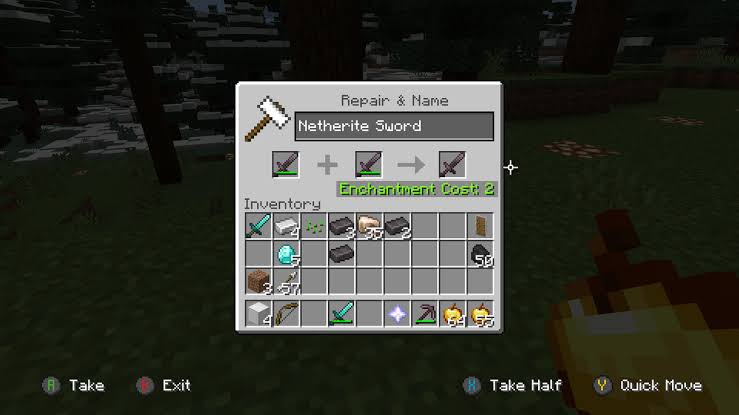
Steps to Repair Using an Anvil:
- Open the anvil interface.
- Place the item to be repaired in the first slot.
- Add either another item of the same type or the material used to craft it (iron ingots, diamonds, etc.).
- Use XP levels to complete the repair.
This works for tools, weapons, and armor. For example, you can repair a diamond pickaxe using diamonds or another pickaxe. Enchantments stay intact, and items can even be combined to stack enchantments together.
Anvil Uses Minecraft Players Should Know:
- Repair gear without losing enchantments.
- Combine two enchanted items.
- Rename items.
Just note the prior work penalty — each time you repair the same item, XP cost increases. After several repairs, it may become too expensive.
How to Repair Tools in Minecraft Bedrock
The process to repair tools in Minecraft Bedrock is almost identical to Java Edition. You’ll use anvils, grindstones, or crafting tables the same way. Enchanted gear still requires an anvil to avoid losing enchantments.
The crafting interface may differ slightly, but the mechanics are the same. XP, anvils, and compatible items all work as expected.
So yes, you can repair armor in Minecraft Bedrock using iron, diamond, or netherite — and keep enchantments with an anvil.
Minecraft Repairing Enchanted Items
When it comes to Minecraft repairing enchanted items, be careful what method you use. There are three ways:
- Anvil: Keeps enchantments intact. Best for repairing enchanted tools and armor.
- Grindstone: Repairs durability, but removes enchantments.
- Crafting Table: Combines two same items, removes enchantments.
To repair enchanted tools in Minecraft, always stick to anvils. Anything else will strip off your hard-earned enchantments.
Repair Bow Minecraft
Bows are one of the most-used weapons, especially if enchanted with Power or Flame. To repair a bow in Minecraft without losing enchantments:
- Combine two bows on an anvil.
- Or repair with string using an anvil (Java Edition only).
- Avoid grindstones if the bow is enchanted.
XP cost depends on the enchantments. If you’ve added Mending, simply collect XP to auto-repair over time.
Repair Fishing Rod Minecraft
To repair fishing rod Minecraft players need to use the anvil method as well:
- Combine with another fishing rod.
- Or repair using string (Java Edition).
- If enchanted, only use an anvil.
Fishing rods are often enchanted with Lure or Luck of the Sea, so don’t let them break — use Mending or repair early.

How to Repair Enchanted Tools in Minecraft
For enchanted tools like axes, shovels, or swords:
- Use an anvil.
- Combine it with the same item or crafting material.
- Keep an eye on your XP levels.
This keeps all enchantments, and if done early, avoids paying too much XP later. Avoid the grindstone at all costs if you’re trying to keep enchantments.
How to Repair Enchanted Armor in Minecraft
Armor is expensive to craft and enchant, so don’t let it break. Here’s how to repair enchanted armor in Minecraft the smart way:
- Place the damaged armor and material (e.g., diamond, iron) in an anvil.
- XP is required for the repair.
- Combine multiple enchanted pieces if needed.
If you’re wondering can you repair armor in Minecraft — yes, and you can keep all enchantments if you do it correctly.
Minecraft Fix: Use Commands to Repair Instantly
Sometimes, you just want a quick fix—especially in creative mode or on a custom server. Here’s how to repair tools in Minecraft with commands:
Java Edition Command:
/give @p diamond_pickaxe{Damage:0} 1
Bedrock Edition Command:
Use the /replaceitem command or set damage value via data pack or mod.
This is the cleanest Minecraft fix if you’re skipping survival mechanics.
How to Repair Tools in Minecraft Without Mending
Mending helps a lot — tools heal using XP instead of an anvil. But if you don’t have the enchantment, you can still repair tools in Minecraft without Mending:
- Use anvil + materials or duplicates.
- Use commands if allowed.
- Combine unenchanted tools in the crafting table.
While it’s more effort, it’s still effective. Just remember the XP cost rises with every repair due to the prior work penalty.
How to Make a Repair Table in Minecraft
Though there’s no official “repair table,” most players build one using:
- Anvil (for enchanted gear)
- Grindstone (for disenchanting)
- Crafting Table (for combining basic items)
This setup lets you do any kind of Minecraft repair from one spot in your base.
It’s especially useful in survival mode, where managing gear is part of long-term gameplay.
Repair and Disenchant Minecraft Items
Want to remove enchantments and get your item back? Use a grindstone.
Grindstone Tips:
- Combine two same items to repair.
- Removes enchantments (disenchant).
- No XP cost.
Perfect if you want to clean an item or reset enchantments. Not good if you want to repair tools in Minecraft without losing enchantment — because grindstones remove them.
Frequently Asked Questions
Q: What block repairs tools in Minecraft?
A: Anvils, grindstones, and crafting tables.
Q: Can I repair my pickaxe in Minecraft?
A: Yes. Use an anvil with another pickaxe or diamond. Or use commands in creative.
Q: Can you repair tools in Minecraft without Mending?
A: Yes. Use anvils and XP, though Mending is more efficient.
Q: How to repair tools in Minecraft with grindstone?
A: Combine two same items, but beware — enchantments are lost.
Explore More: Get Serious With Real Tools
If you love fixing things in Minecraft, you’ll enjoy learning how real-world industrial tools work. Visit Industrial Tools Hub — the ultimate destination for tool reviews, comparisons, and in-depth guides.
From drills to welding kits, they cover everything hands-on. Click here to check out https://industrial-tools-hub.com/ and power up your real-world skills.